 |
Utilities Desktop Enhancements |
 World Time Clock World Time Clock |
| This program shows the time of five different timezones, with analog and digital clocks. Choose from a list of 150 countries and 400 cities or define up to 5 countries and cities of your own. |
| More... |
| TimeZone |
| The purpose of this program is to provide the user with a utility to find the local time in locations throughout the world. |
| More... |
| PCLoupe |
| PCLoupe is a display utility that shows a magnified image of the area around your mousepointer. Great for graphic artists or the visual impaired. |
| More... |
| Taskix |
 63 kB 63 kB |
 XP/2003/Vista XP/2003/Vista |
| Rearrange Taskbar items using this super-small app. | ||
| WinSplit Revolution |
1.2 MB |
2000/XP/2003 |
| WinSplit Revolution is a small utility which allow you to separate your screen into two, three or four... Especially suitable for high-end LCD screens with big resolutions, WinSplit Revolution helps you to manage efficiently active windows. Features and options: - automated window handling (resize, move, reorganize, close tasks) - shape - process association - global hotkeys and clickable virtual numpad - automatic startup |
||
| ClickOff |
472 kB |
all |
| Are you sure you want to exit? Yes, I'm sure. I sure as heck wouldn't have clicked 'Close' if I wanted the program to stay open. We've all seen those annoying 'Are You Sure?' prompts. Well, this thing helps get rid of 'em. That's right, they will bother you no longer. Just get ClickOff and select which program windows and dialogs you never want to see again. With it, you can also close browser pop-up windows, as well as automatically minimize and maximize 'em. | ||
| .NET News Vista Gadget |
16 kB |
Vista |
| .NET News On Your Desktop is a project developed by Blocks4.NET in order to notify .NET users / developers community about latest .NET components news. News are received from Blocks4.NET web site and displayed to your desktop by using a Channel Definition File and the Windows Active Desktop feature included in Windows 98, ME, 2000, XP and 2003. This is an essential tool for software developers that use custom controls, software components, code generators, and other productivity tools. | ||
| Event Notifier |
2.48 MB |
2000/XP/Vista |
| Event Notifier is a Three Steps Wizard to create unlimited Notification Events using the icons of your installed programs that you think they correspond better for the reason you want to be notified for. It notifies you with a Tray tip, a sound, and by changing its Notification area and Task bar icon for 10 minutes with the selected desirable one. | ||
| OemGeneratorXP |
1543 kB |
all |
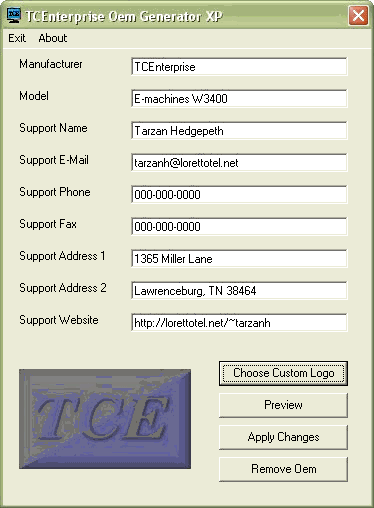
| Oem Generator allows you to add a custom logo and support information to the properties tab of 'My Computer' like major computer companies. Let all who use your systems know that you are competitive and progressive. Works on all Windows platforms, and requires very little resources. A must have for system builders, and just good fun for all. If you are a system builder, after application of your logo and support information, you can uninstall the main program, but your logo and support information remain. This will prevent the end user from altering your logo, or losing your support information. Even if you are not a system builder, imagine the fun of having a picture of your best girl, your dog, your car, or whatever you like show up in the system properties of 'My Computer'. All changes can quickly be removed by clicking the "Remove Oem" button. This does not uninstall the program, it simply removes all logos and support information. Repeat as often as you like. There is no danger to your system. | ||
 Home Home |
 Screenshot Screenshot |
 Download Download |
| X'nBeep |
906 kB |
XP |
| X'nBeep is a digital alarm clock for Windows XP only! Widget, Clock, Beeper, your desktop will enjoy this little software! | ||
| Dimension 4 |
206 kB |
2000/XP/2003 |
| Simply put, Dimension 4 is the fastest and easiest way to synchronize your PC's clock for Windows-based operating systems. Once Dimension 4 is installed, you'll most likely forget that it's even running. It's that automatic. Dimension 4 will monitor your Internet connection and automatically adjust your PC's clock when you're online at an interval you specify. | ||
| DesktopZoom |
342 kB |
2000/XP |
| A zoom/magnify program with lots of options: zoom around the mouse, zoom a fixed window, zoom the entire desktop, use the mouse inside the zoomed window, etc. | ||
| Home |
 Screenshot Screenshot |
Download |
| WatchCat |
147 kB |
95/98/Me/NT |
| WatchCat 2.0 (last freeware version) uses a menu to keep track of programs you are running, letting you hide any running application from view. Application windows that are hidden by WatchCat not only disappear from your Windows desktop but also disappear from the Taskbar and from the list of running tasks displayed by ALT-TAB. To hide or unhide any application, simply right-click on WatchCat's System Tray icon and select an application from the menu that appears; applications that appear on the bottom of the menu are ones that are currently hidden. | ||
| Home |
||
| Serious Samurize |
4.74 MB |
2000/XP |
| Samurize is the popular advanced system monitoring and desktop enhancement engine for Microsoft Windows 2000/XP/2003. IT professionals, overclockers, gamers and desktop modders alike use Samurize for system information, weather reports, news headlines and much much more. And best of all, Samurize is 100% free! Samurize's rich feature set includes: - an unrivalled set of built-in meters (Disk utilization, CPU usage, network traffic, system temperatures...) - ultimate customizing and skinning possibilities with no programming knowledge required - monitoring your own computer or others over a network - tiny memory footprint and CPU usage - the first system monitoring tool with a true WYSIWYG editor - full extensibility via scripts and plugins with a powerful plugin SDK/API - minimal software requirements (no .NET or Service Packs necessary) - multimonitor support - many usage options (desktop, taskbar and clock clients, server outputting to XML or image formats, screensaver) Samurize: The Only Limit Is Your Imagination. |
||
| Desktop Cleaner |
116 kB |
2000/XP/2003 |
| Desktop Cleaner scans your desktop to see when the last time each one was used. Then it compares it to your user preferences, if it has been too long since the file was used, it will either move or delete it according to your preferences. Desktop Cleaner also scans for folders that were created by decompressing ZIP, RAR, ACE among other compression files (Using the Extract to FILENAME function). If both the compressed file and the folder are both present, it deletes the folder and keeps the compressed file. Other features include: full recurse of the desktop and its subfolders and files, removal of empty folders, removal of zero-byte files, user options, text configuration files for both the compression file list as well as the user options. | ||
| SendToAny |
68 kB |
95/98/NT/ME/2000/XP |
| SendToAny extends the Windows Explorer 'Send To' context menu with all known links. This is accomplished by synchronizing the Send To Menu with the Start Menu, Desktop and Quick Launch Menu. This allows any file to be sent to any application, regardless of file-type association. | ||
| Total Copy |
535 kB |
98/2000/NT/XP |
| Total Copy is a handy shell extension, that allows you to pause and resume file copies under Windows. It integrates into the right click menu and becomes available whenever you drag files or folders to copy them. You can also limit the copy speed, if needed. Total Copy also speeds up the overall copy process. The program does not modify the default copy function, but rather installs as an additional option. |
||
| TaskSwitchXP |
147 kB |
XP/2003 |
| TaskSwitchXP provides the same functionality as the existing application switching mechanism in Windows XP/2003 today. When the hotkey combination Alt + Tab (or Alt + Shift + Tab) is pressed, TaskSwitchXP generates the list of open windows in which the end user is working. This list of open windows is presented as a group of icons, with one outlined by a selection rectangle. As the end user continues to hold the Alt key and presses the Tab key, the selection rectangle moves to the next (previous) icon. The selected icon represents the application that Windows will bring to the foreground once the Alt key is released. In addition to displaying an icon list, however, TaskSwitchXP show also a thumbnail preview of the window that will be switched to. | ||
| Switch Window |
735 kB |
ME/2000/XP |
| We all have faced a situation when we need to keep dozens of windows open -documents, e-mail client, several web browser windows - all mess up the Taskbar resulting in poor computing experience and frustration. SwitchWindow is a freeware tool that provides two important functions from virtually any spot you can right-click: it allows switching to the desired window using menu as well as closing unwanted windows with CTRL+Right Click combination! | ||
| Screenshot |
||
| WinTray |
109 kB |
98/NT4/Me/XP/2000 |
| When the taskbar is clogged with multiple buttons for all those open windows, WinTray can be used to hide them as system tray icons, saving space. Easy access is provided to the hidden windows through hotkeys or their system tray icon (or both). WinTray can even be set to apply hotkeys and/or system tray icons when it starts up. Use WinTray to save you space and to hide windows from view when they're not needed. You will need Visual Basic 6 Runtime files in order to run this program. |
||
| SwizzTool |
676 kB |
95/98/NT/ME/2000/XP/2003 |
| Easy to use alarm clock to set alarms/reminders that can display messages, play sounds/music, execute programs, run system commands, reboot/log out, turn of computer, open/print documents and more. All tasks that alarms can execute can also be executed manually. Built in Memo with easy access to open URLs, and search various Internet sites. Clipboard manager that let you save three extra clipboard texts, actions can also be directly applied to the current clipboard, like open in browser, add it to the Memo or search on websites that you can specify yourself. | ||
 Utilities
Antivirus
Backup
» DVD backup
Clipboard
Desktop Enhancements
File & Disk Management
» Cleanup Tools
» Data Recovery
» Disk Tools
» File Managers
» File Renaming
» File Searching
» File Splitting
» Misc. Utilities
File Compression
Firewall
Launchers
Network
Optimizers & Diagnostics
Printers
Registry
Security & Encryption
System Utilities
Text Editors & Tools
Uninstallers
© The Network